People have reported over the years that at some point their DPI button on their mouse stopped working. And the scroll wheel is blinking continuously.
reddit forum
I want to share something I did which solved the problem in my case.
From my analysis it looked like the electronics “thinks” the DPI button is constantly pressed. That’s why the battery check is activated (blinking scroll wheel) and pressing the DPI button doesn’t do anything (because alledgly it’s alredy pressed).
My mouse is Model D wireless.
I opened the case and disconnected all the cables from the main bottom PCB. I gently removed the top PCB where two side buttons and DPI button is located. I desoldered the connection on that top PCB for the 4 wire cable -
the one with white and pink wires.
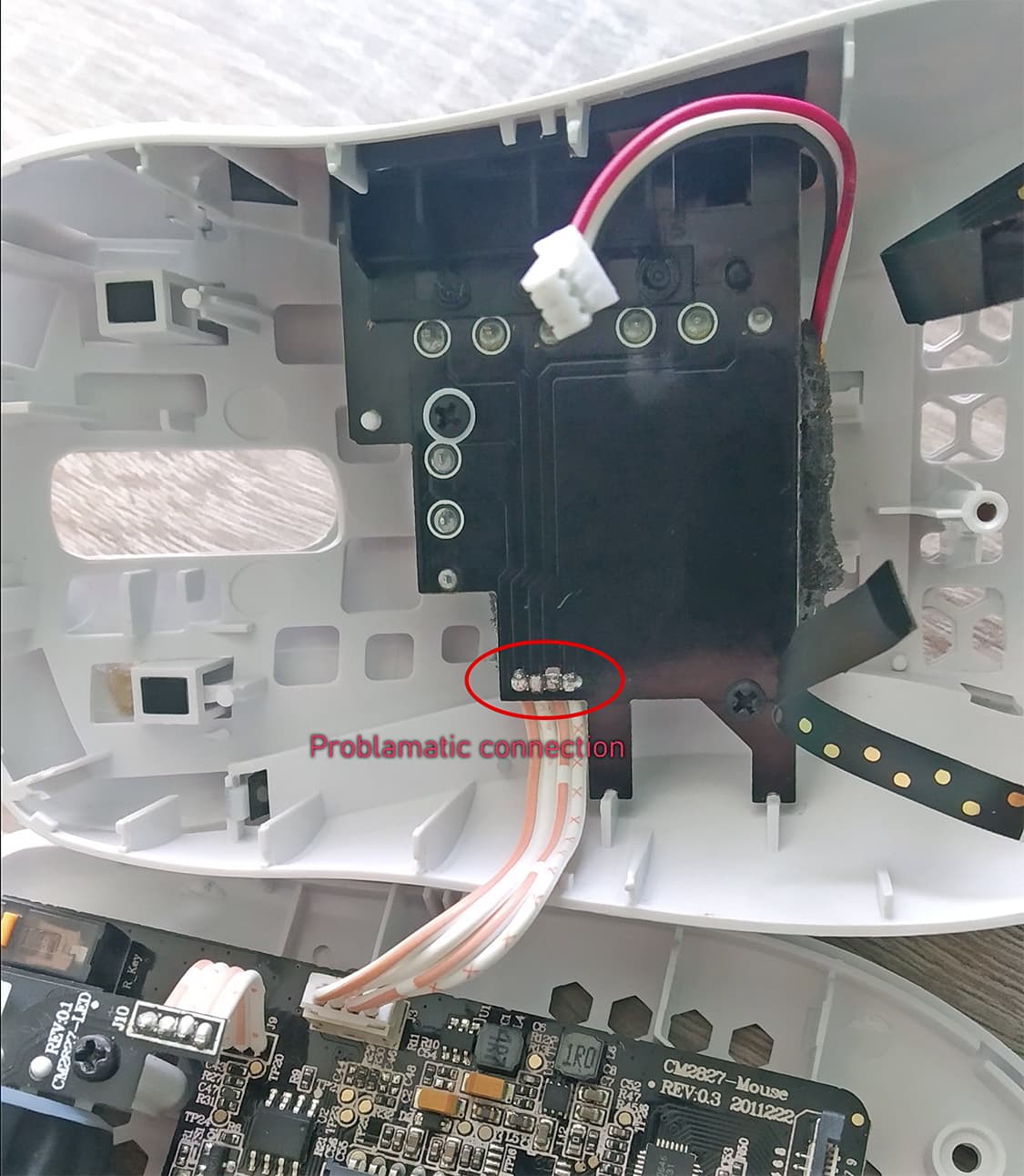
I removed the old tin from the pads with copper braid. The I cleaned them with the acetone (be carefull with that because it melts the mouse plastics, you can damage the mouse case). Then I re-soldered the cable and used the aceton again to clean the spaces between the pads.
I reassembled everything and DPI button started to work again. And no more blinking scroll wheel.
It looks that for some reason there was too low resistance between the pads which caused the electronics to treat the readout as a pressed DPI button. Maybe just cleaning the connection would be enough to solve the problem.